

By using this site, you agree to the Privacy Policy and Terms of Use.
Accept
sauce.co.kesauce.co.kesauce.co.ke
  • News
  • Grapevine
  • Politics
  • Security
  • Business
  • Technology
  • Media
  • Sports
  • Entertainment
Reading: How to file nil KRA returns
Share
Notification Show More
Font ResizerAa
sauce.co.kesauce.co.ke
Font ResizerAa
  • News
  • Grapevine
  • Politics
  • Security
  • Business
  • Technology
  • Media
  • Sports
  • Entertainment
Search
  • News
  • Grapevine
  • Politics
  • Security
  • Business
  • Technology
  • Media
  • Sports
  • Entertainment
Have an existing account? Sign In
Follow US
  • Advertise
© 2022 Foxiz News Network. Ruby Design Company. All Rights Reserved.
Home » News » How to file nil KRA returns

How to file nil KRA returns

Last updated: July 24, 2023 10:37 am
David Osoro 3 years ago
Share
3 Min Read
SHARE

In this article, we explain to you how to file KRA nil returns. KRA Nill returns are filed by taxpayers who do not have an income source. If you have no rental, business, or employment income for the return period under review, you must submit KRA Nil Returns on the iTax Portal. This is what a source of income means.

What is KRA iTax Nil Return?

Each Kenyan with a KRA PIN is required to submit their iTax Returns annually by June 30 at the latest. So, if you have a KRA PIN Number, regardless of whether you are employed or jobless, you must file KRA tax returns, and failing to do so would result in a fine from the Kenya Revenue Authority (KRA).

The unemployed, or those without a source of income, are covered under KRA Nil Returns. The taxpayer has no rental, business, or job income as a source of income.

Please remember that everybody in Kenya with a current KRA PIN must report their yearly income. If you are employed, you must use the P9 Form issued by your employer to file your KRA iTax Returns.

Requirements to File KRA iTax Nil Returns 2023

  • Your KRA iTax PIN
  • Your KRA iTax Password 

How to File KRA iTax Nil Returns in 2023

You must still file KRA Nil Returns even if you are unemployed by following the instructions listed below:

Step 1

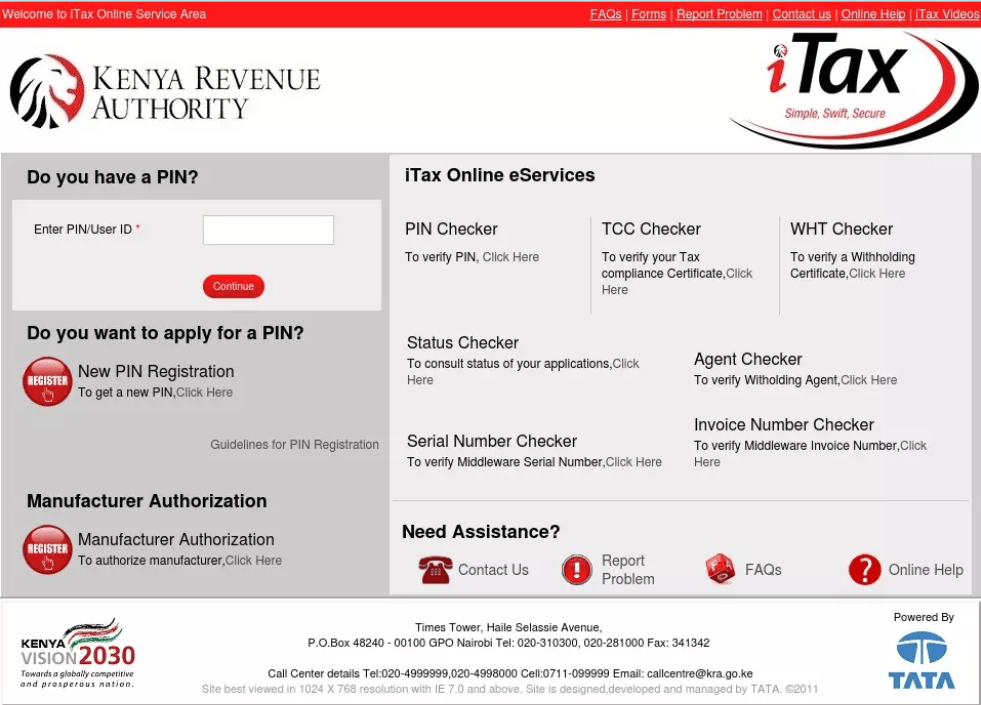
Open your computer browser and navigate to the KRA iTax portal. There, enter your KRA PIN and iTax Password to access your iTax account.
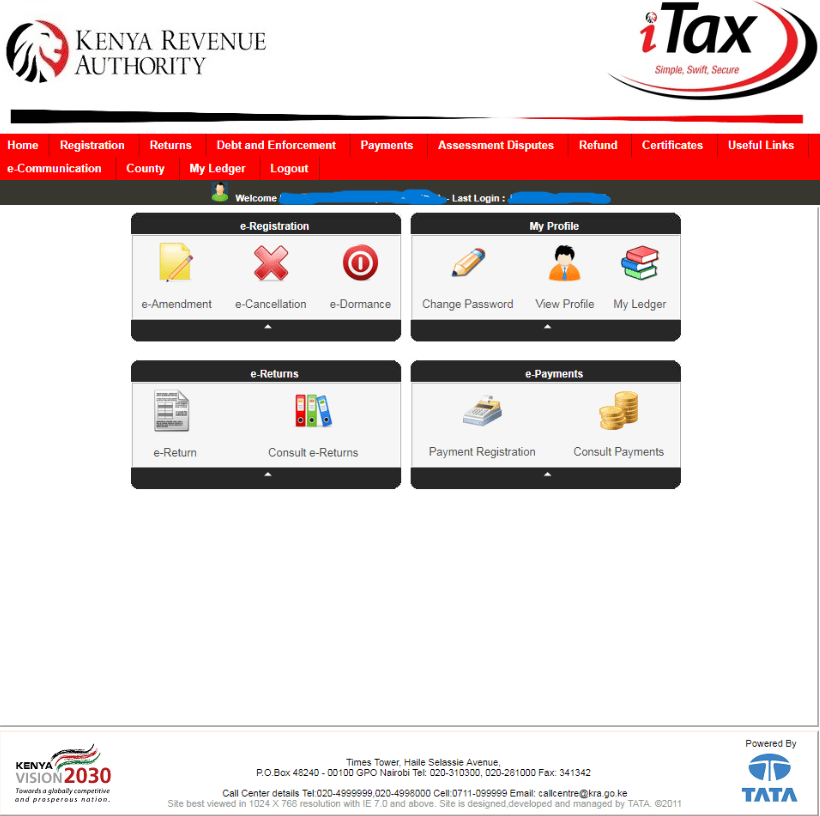
Once you have successfully logged into your KRA iTax account, you should see the dashboard below.
Step 2

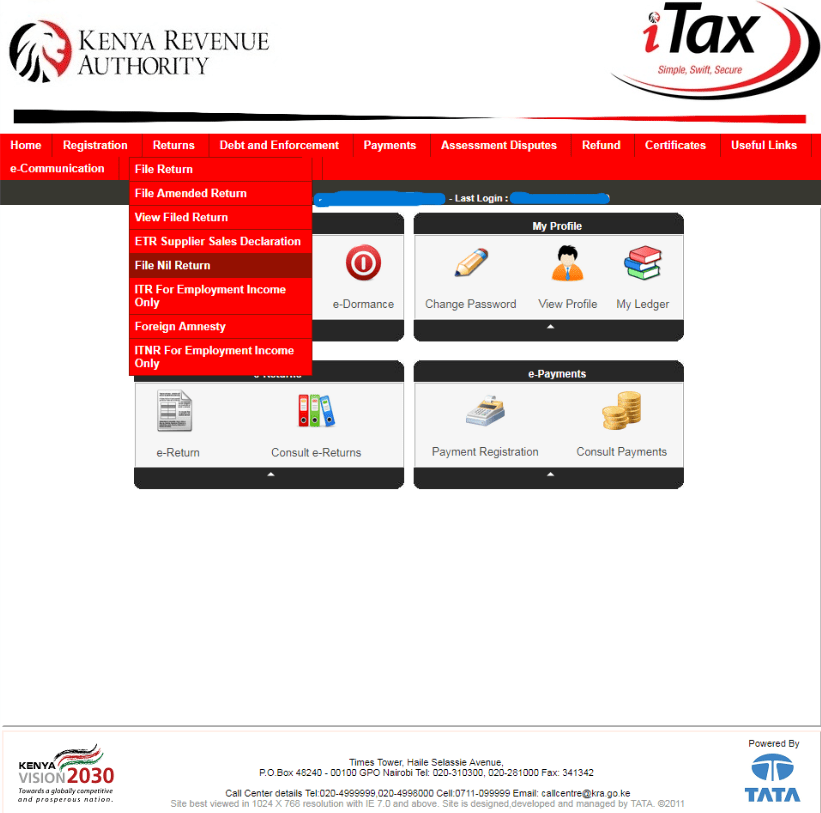
 Click on Returns in the top panel menu, then on the ‘File Nil Return’ tab.
Step 3:

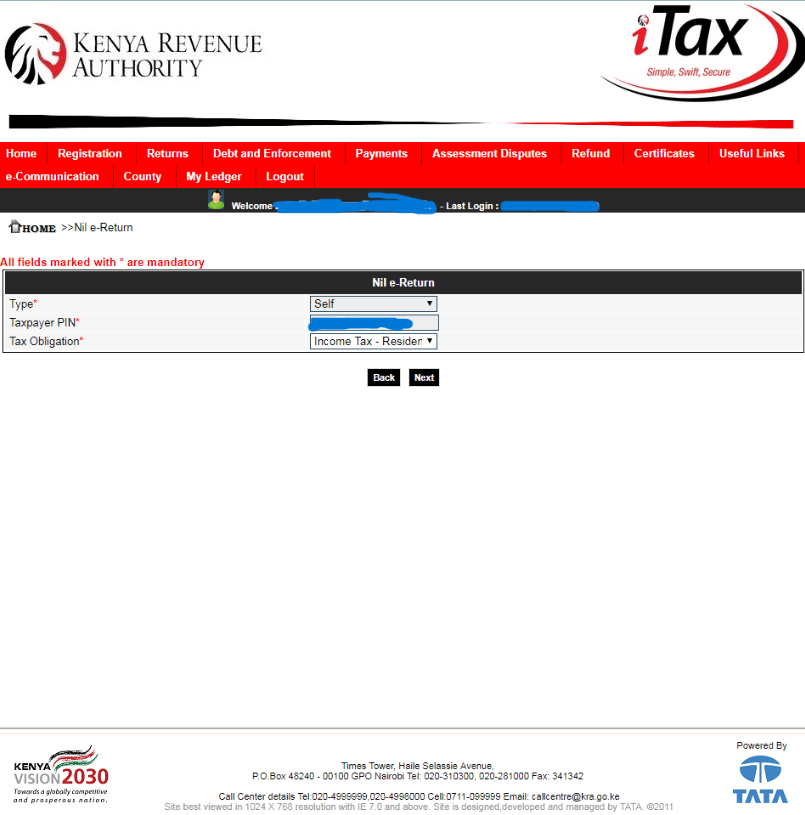
After choosing the Nil e-Return, you will be directed to a page that needs your input.

Make your selection from the drop-down arrow next to “Type” to “Self.” Your KRA PIN number will immediately fill on the system. Choose “Income Tax Resident” in the Tax Obligation section, and then click “Next” to continue.
Step 4

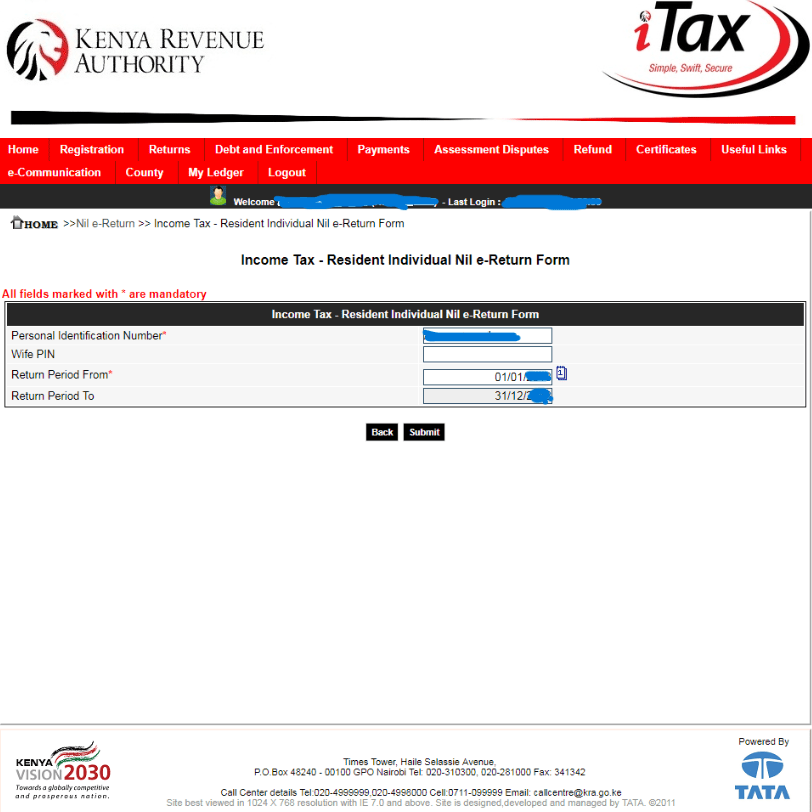
Proceed to fill the Income Tax – Resident Individual Nil e-Return form. 

Once done, click on the submit button to move on to the next step.
Step 5

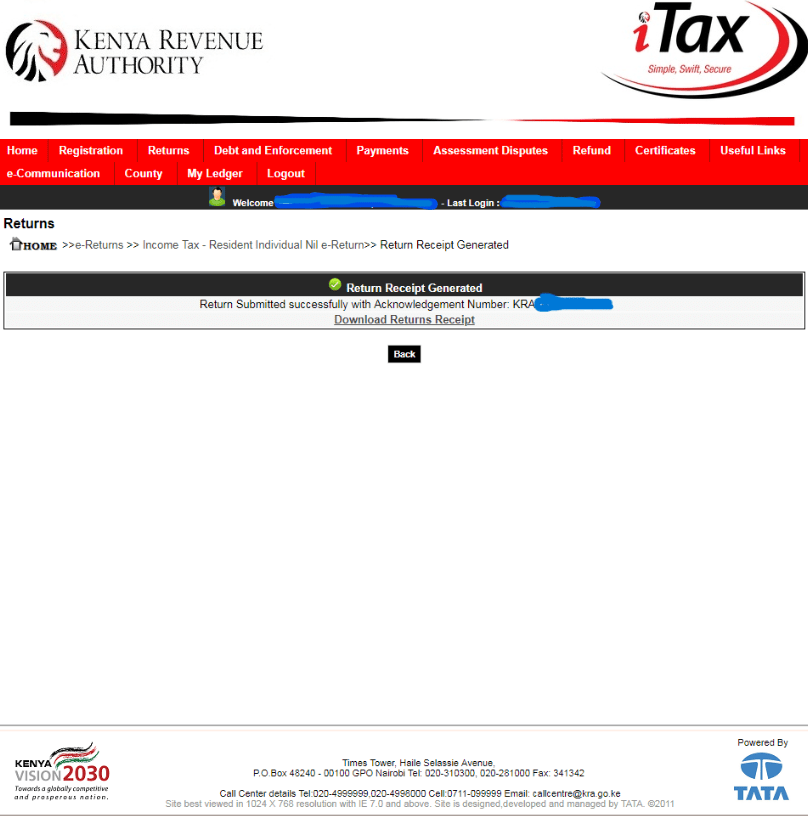
Upon successful submission of your KRA Nil Returns, a return receipt will be generated with an acknowledgment number, download that receipt.
Step 6

In order to show that you have successfully filed the KRA Nil Returns for the relevant year, print the KRA e-Return Acknowledgement Receipt that you downloaded.


You Might Also Like

Venezuela Declares State of Emergency After Powerful Twin Quakes

SHA Suspends M.P. Shah Hospital From Its Provider Network Pending Investigations

Court Declines to Stop Bonfire Co-Founder From Using 48 Phone Lines in Divorce Case

Dettol Pulls Controversial Advert After Backlash Over ‘Toxic Men’ Comparison

Police Barricade Major Roads Into Nairobi Ahead of June 25 Commemorations

Share This Article
Facebook Twitter Whatsapp Whatsapp Email
Previous Article Manchester United reach deal to sign Mason Mount from Chelsea
Next Article 41 dead as truck rams into crowd in Londiani, Kericho

Latest stories

  • Venezuela Declares State of Emergency After Powerful Twin Quakes
  • SHA Suspends M.P. Shah Hospital From Its Provider Network Pending Investigations
  • Court Declines to Stop Bonfire Co-Founder From Using 48 Phone Lines in Divorce Case
  • Dettol Pulls Controversial Advert After Backlash Over ‘Toxic Men’ Comparison
  • Police Barricade Major Roads Into Nairobi Ahead of June 25 Commemorations
  • Gachagua Accuses Murkomen of Sponsoring Goons, Questions Security Intelligence Claims
  • Nairobi Assembly Approves Raila Odinga Monument at Supreme Court Roundabout
  • One Suspect Released as Eight Students Face Murder Charges Over Utumishi Girls Dormitory Fire
  • IEBC Sets August 10, 2027 as General Election Date

You Might Also Like

Gachagua Accuses Murkomen of Sponsoring Goons, Questions Security Intelligence Claims

2 days ago

Nairobi Assembly Approves Raila Odinga Monument at Supreme Court Roundabout

2 days ago

One Suspect Released as Eight Students Face Murder Charges Over Utumishi Girls Dormitory Fire

2 days ago

IEBC Sets August 10, 2027 as General Election Date

2 days ago

Pages

  • About us
  • News
  • Privacy Policy
  • sauce.co.ke

Find Us on Socials

sauce.co.kesauce.co.ke
Follow US
All rights reserved. A publication of Mercury Communications KE